Architecture
This document outlines the architecture for the Jasonelle cross-platform web wrapper generator framework.
Architecture Overview
The system is designed around a cascading asset injection strategy, a modular CLI approach, and a strictly separated directory structure.
-
Cascading Configuration & Assets:
lib/common/is the base layer. Platform directories (lib/xcode/,lib/android/) override or extend it — same path, platform wins. -
Native File Overrides: Placing a file in
lib/<platform>/sources/automatically replaces the corresponding file fromsources/<platform>/during the build. -
Store Metadata:
config/store.jsoncand.envmanage store metadata and secrets.task jsoncmerges them per platform intobuild/xcodeandbuild/android. -
TypeScript Bundling: the
bundlertool merges TypeScript files fromlib/commonandlib/<platform>into a singlewebview.js. Common scripts are copied first, platform scripts overlay on top. -
Unified Build Pipeline: the
gentool (run via theTaskfilegentask) orchestrates the Go toolsicon,jsonc,bundler,plugins,core,linkandappconfto assemble bothbuild/xcodeandbuild/androidfrom the samelib/andsources/inputs.
Build Pipeline
The build pipeline turns the user workspace (lib/) and the stock templates
(sources/) into two runnable native projects under build/. The gen tool
(task gen, or tools/gen/dist/gen-<os>-<arch>) runs the steps in order for
both platforms:
| Step | Tool | Writes to | Responsibility |
|---|---|---|---|
1 |
|
|
Generates the Android and Xcode app icons from
|
2 |
|
|
Merges the cascading |
3 |
|
|
Bundles the TypeScript scripts ( |
4 |
|
|
Copies the plugins declared in the merged per-platform configs so only configured plugins reach the project. |
5 |
|
|
Assembles the app source tree ( |
6 |
|
|
Links the plugin projects into the Xcode workspace, the Android Gradle files
and the Application project, and copies the built |
7 |
|
|
Rewrites |
After the last step each build/<platform>/ directory contains a complete,
configured native project ready to open and build.
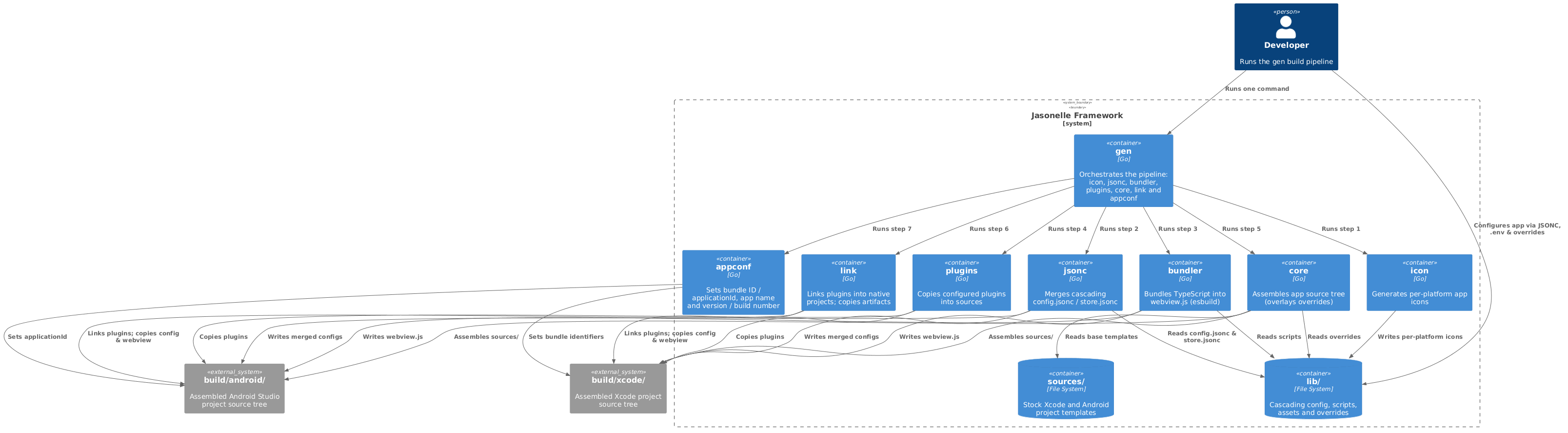
C4 Architecture Diagram
The diagram below shows the current architecture. The gen tool runs the
icon, jsonc, bundler, plugins, core, link and appconf Go tools in
order for both platforms, reading from lib/ and sources/ and writing to
build/.

Directory Structure
-
.gitignore: Excludes.envandbuild/. -
sources/: Base project templates.-
sources/xcode/: Xcode project template (Swift, storyboards, workspace). -
sources/android/: Android Studio project template (Kotlin, Compose, Gradle).
-
-
lib/: User workspace for configurations and overrides.-
lib/common/:-
.env: Secret keys for tools and stores. -
config/config.jsonc: Foundational configuration. -
config/store.jsonc: Shared app store metadata. -
config/bundler.json: TypeScript config for esbuild. -
assets/icon/1024x1024.png: Base icon for store listings. -
resources/: Raw files copied to the app bundle. -
scripts/main.ts: Base TypeScript entry point for the webview.
-
-
lib/android/:-
config/config.jsonc: Android configuration overrides. -
config/store.jsonc: Play Store specific overrides. -
scripts/main.ts: Android TypeScript overrides. -
sources/: Native file replacements (e.g., customMainActivity.kt). -
assets/: Play Store specific assets. -
resources/: Raw files copied to the Android app bundle.
-
-
lib/xcode/:-
config/config.jsonc: Xcode configuration overrides. -
config/store.jsonc: App Store specific overrides. -
scripts/main.ts: Xcode TypeScript overrides. -
sources/: Native file replacements (e.g., customContentView.swift). -
assets/: App Store specific assets. -
resources/: Raw files copied to the Xcode app bundle.
-
-
-
tools/: CLI tools and vendored binaries.-
tools/gen/: Runs the full build pipeline (icon,jsonc,bundler,plugins,core,link,appconf) as theTaskfilewould (Go). -
tools/icon/: Generates per-platform app icons from a 1024x1024 PNG (Go). -
tools/jsonc/: Merges cascading JSONC config files (Go). -
tools/bundler/: Bundles TypeScript intowebview.jsvia esbuild (Go). -
tools/plugins/: Copies the configured plugins into the build sources (Go). -
tools/core/: Assembles the app source tree, overlaying overrides (Go). -
tools/link/: Links plugins into the native projects and copies app artifacts (Go). -
tools/appconf/: Sets the app identifiers, name and version / build number from the merged configs (Go). -
tools/vendor/esbuild/: Vendored esbuild binary for TypeScript bundling.
-
-
build/: Generated output (git-ignored).-
build/xcode/: Assembled Xcode project.-
config/: Mergedconfig.jsoncandstore.jsonc. -
scripts/: Bundledwebview.js. -
sources/: Assembled Xcode source tree with linked plugins and app artifacts.
-
-
build/android/: Assembled Android Studio project.-
config/: Mergedconfig.jsoncandstore.jsonc. -
scripts/: Bundledwebview.js. -
sources/: Assembled Android source tree with linked plugins and app artifacts.
-
-