Xcode (iOS) Source Project
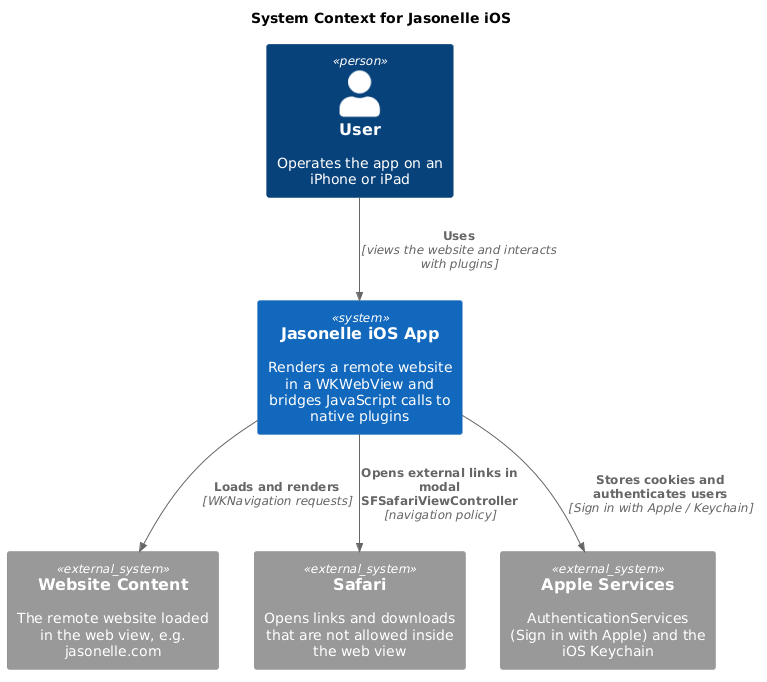
The iOS source project for Jasonelle. It is a native SwiftUI app that renders a
website inside a WKWebView and bridges JavaScript calls to native Swift
plugins through a bidirectional message channel.
Repository layout
| Path | Contents |
|---|---|
|
Xcode workspace that groups the app, the kernel framework and the plugins. |
|
The iOS app target. Contains SwiftUI views, resources ( |
A reusable framework consumed by the app: |
|
A sample plugin that demonstrates the native–JavaScript bridge. |
|
A plugin that reports device information to JavaScript. |
|
A plugin that persists web view cookies in the iOS Keychain. |
|
A plugin that provides Sign in with Apple. |
|
A plugin that records OpenTelemetry counters and histograms. |
|
|
SwiftLint rules. |
|
Formatting rules for C/C++/Objective-C sources. |
|
|
Architecture
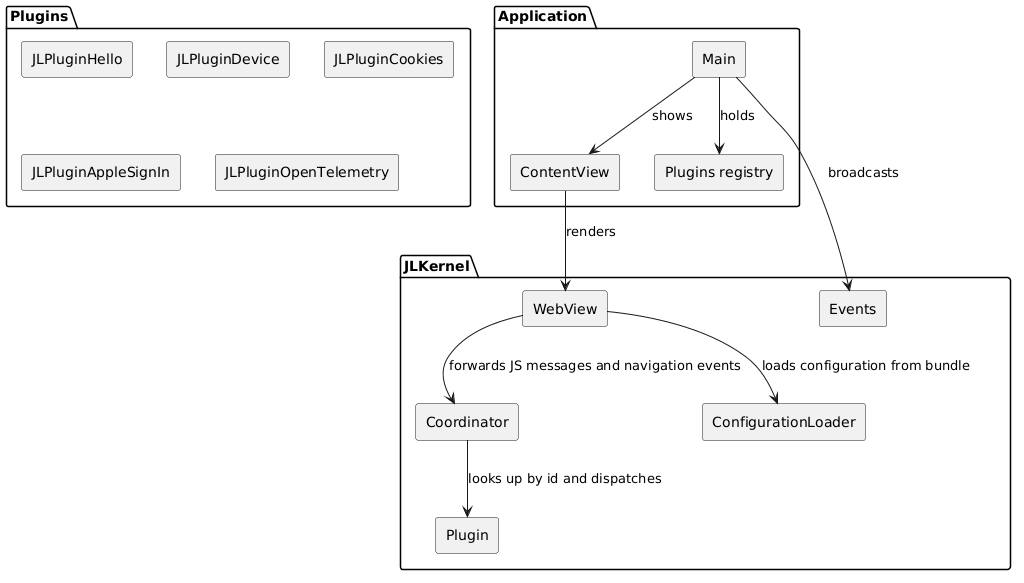
Jasonelle iOS follows a layered architecture. The Application layer owns the SwiftUI lifecycle and the registered plugin instances. The JLKernel layer provides the web view, the JavaScript bridge and the message routing. The plugins layer implements native features callable from JavaScript.
The JavaScript Bridge
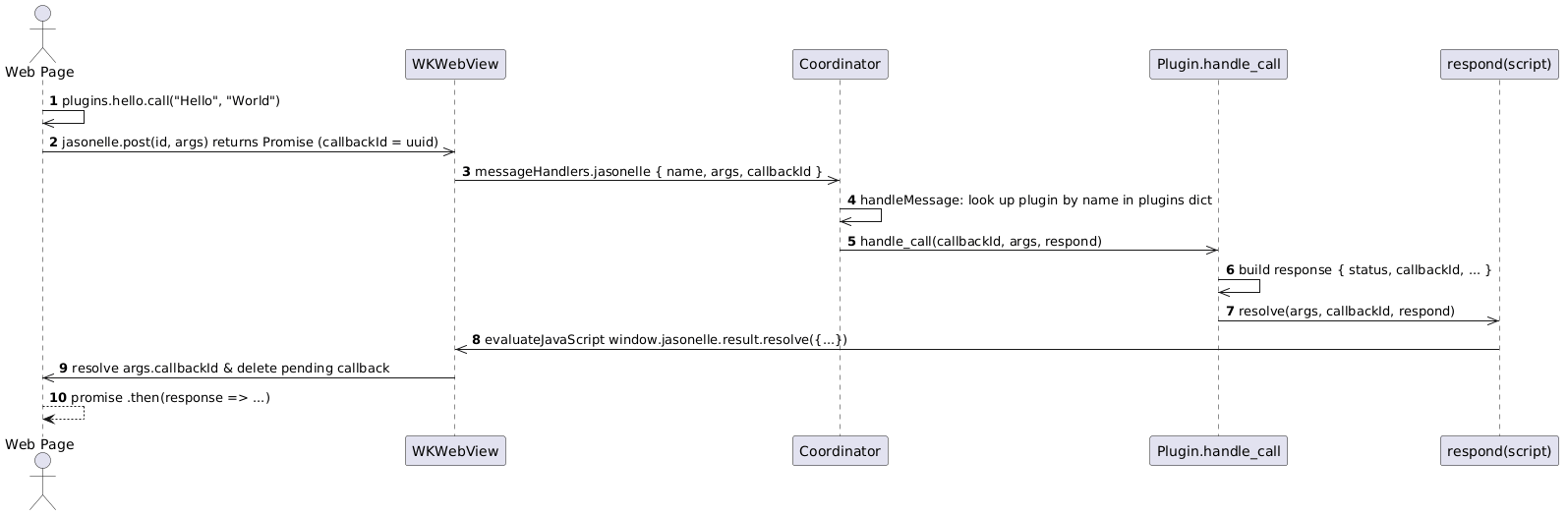
The bridge is a bidirectional message channel between the page loaded in the
WKWebView and native code.
-
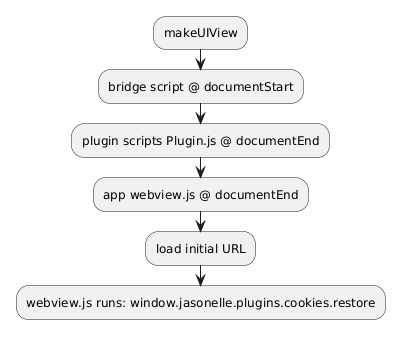
WebView.jsBridgeScriptis injected at document start and defines thewindow.jasonelleobject withpost(name, args),result.resolve,result.rejectandplugin.init. -
Each plugin’s
Plugin.jsis injected at document end and registers itself onwindow.jasonelle.plugins.<name>. -
JavaScript posts a message to
window.webkit.messageHandlers.jasonelle. -
The
Coordinatorresolves the message to a plugin and invokeshandle_call(callbackId:args:respond:); plugins reply throughresolveorreject, which evaluatewindow.jasonelle.result.resolve|reject(…)back in the page.
The message body is a dictionary:
{ "name": "com.jasonelle.plugins.hello", "args": ["Hello", "World"], "callbackId": "<uuid>" }name is the plugin id (reverse domain notation), which is also the key in
the plugins dictionary registered by the application.
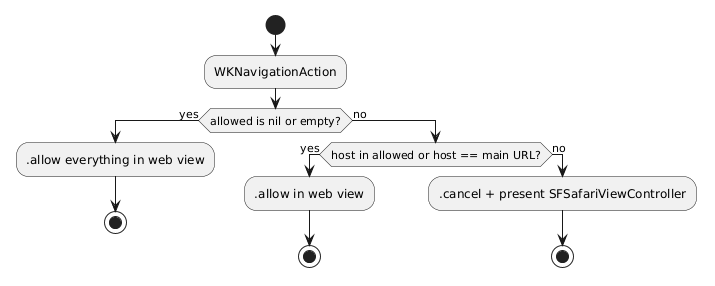
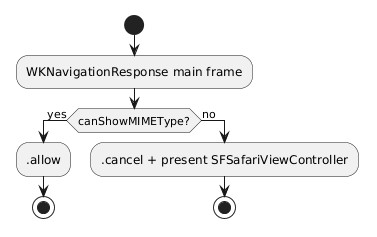
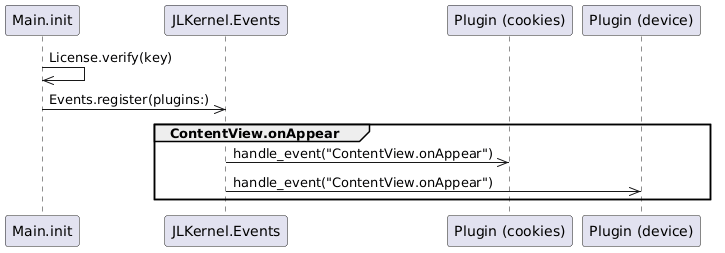
JLKernel components
| Component | Responsibility |
|---|---|
|
SwiftUI |
|
|
|
Base class every plugin subclasses. Provides |
|
Enum of native events with a static plugin registry, |
|
Loads |
|
Structured logging over |
|
Reads the bundled |
|
Verifies a Jasonelle license key; aborts on physical devices without a license, logs a reminder in the simulator. |
Plugins
Each plugin is an independent Swift module (a framework inside the workspace)
that subclasses JLKernel.Plugin. Plugins are composed by the Application in
Plugins.swift, which imports and instantiates them. Keys must match the
plugin id used in JavaScript (window.jasonelle.plugins.<name>).
| Plugin | Native API | JS object |
|---|---|---|
|
|
|
|
|
|
|
|
|
|
|
|
Sign in, credential state and native button via |
|
Development
-
Open
Jasonelle.xcworkspacein Xcode to build theApplicationscheme. -
Unit tests live in each module’s
<Module>Teststarget (JLKernelTests,JLPluginHelloTests,JLPluginDeviceTests,JLPluginCookiesTests,JLPluginAppleSignInTests,JLPluginOpenTelemetryTests,ApplicationTests). -
Run SwiftLint with
task lint(auto-fix withtask fix). -
Build a scheme with
task buildand run its tests withtask test(see Creating Plugins for the full command reference). -
Each module ships a DocC catalog (
*.docc) describing its public API. Open the workspace in Xcode and select "Documentation" in the navigator to browse them.